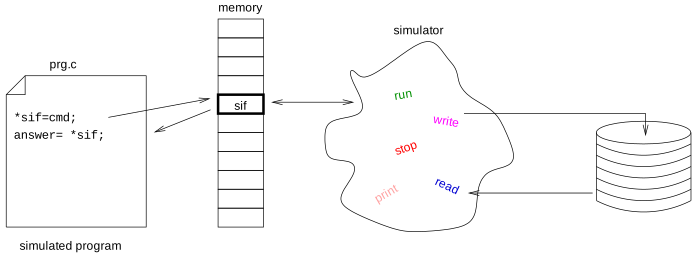
Using the simulator interface the simulated program can control the
simulation, it can get information about the interface, stop simulation
and it can do console and file io.
Interface is available behind a memory location, which can be any data memory location which is readable and writable by the program. Program can send command to the interface by writing one character command code into the memory location (although some of them needs parameter) and can read back answer from the same location.
The interface must be turned on before use. It means that you must specify the address of the memory location to use. It can be done in two ways.
Using -I option of the simulator program
-I option accepts a list of settings in form: setting=value. Know settings are:
ucsim_51 -I if=xram[0xffff]
Configuring virtual simif peripheral
If you check hardware elements of simulated processor with conf command, you will see one called simif. Setting of this peripheral will setup the simulator interface:
$ ucsim_51 -p "s51> "
uCsim 0.9.10, Copyright (C) 1997 Daniel Drotos.
uCsim comes with ABSOLUTELY NO WARRANTY; for details type `show w'.
This is free software, and you are welcome to redistribute it
under certain conditions; type `show c' for details.
0s51>
Using info command you can get state of the interface, known commands, and other information:
$ ucsim_51
0> info hw simif
uCsim simulator interface, version 1, at (null)[0x0]
Active command: none.
Known commands:
0x5f/_ if_detect: Detect existence of interface
0x69/i commands: Get information about known commands
0x76/v if_ver: Get version of simulator interface
0x56/V sim_ver: Get version of simulator
0x40/@ if_reset: Reset interface to default state
0x49/I cmdinfo: Get information about a command
0x68/h cmdhelp: Get help about a command
0x73/s stop: Stop simulation
0x70/p print: Print character
0x78/x print_hex: Print character in hex
0x66/f fin_check: Check input file if input available
0x72/r read input file: Read character from input file
0x77/w write to output file: Write character to output file
0x52/R reset cpu: Reset CPU
0x4c/L set execution limit: Set execution limit for simulation
0x6c/l get execution limit: Get value of simulation execution limit
Input file:
Output file:
Configuration memory of simif
0x00 00000001 . Turn simif on/off (bool, RW)
0x01 00000000 . WR: sets running state, RD: check if simulation is running
0x02 00000000 . WR: start simulation, RD: true if running
0x03 00000001 . WR: stop simulation, RD: true if stopped
0x04 00000000 . Quit simulator (any, WO)
0x05 00000000 . Reason of last stop (int, RO)
0x06 00a8c000 . Xtal frequency in Hz (int, RW)
0x07 00000000 . Nuof ticks simulated so far (int, RO)
0x08 00000000 . Ticks spent in ISR (int, RO)
0x09 00000000 . Ticks spent in idle state (int, RO)
0x0a 00000000 . Real time since reset in msec (int, RO)
0x0b 00000000 . Nuof simulated virtual clocks (int, RO)
0x0c 00000000 . Print char on stdout (int, WO)
0x0d 00000000 . Write char to simif output (int, WO)
0x0e 00000000 . Limit of instructions to simulate by run (uint, RW)
0>
Use set hardware command to setup the interface:
$ ucsim_51
0> set hw simif
set hardware simif memory address
set hardware simif fin "input_file_name"
set hardware simif fout "output_file_name"
0>
To turn on the interface, use following command:
$ ucsim_51
0> set hw simif xram 0xffff
0> info hw simif
uCsim simulator interface, version 1, at xram[0xffff]
following commands can be used to specify input and output files:
$ ucsim_51
0> set hw simif fin "infile.txt"
0> set hw simif fout "outfile.txt"
0> info hw simif
Input file: infile.txt
Output file: outfile.txt
Access interface from simulated program
To access memory content, you have to use C variable. If address is already known, you can setup a pointer with that address to access the content:
#define SIF_ADDRESS_SPACE_NAME	"xram"
#define SIF_ADDRESS_SPACE	__xdata
#define SIF_ADDRESS		0xffff

volatile unsigned char SIF_ADDRESS_SPACE * sif;<br><br>void
main(void)
{
  sif= (unsigned char SIF_ADDRESS_SPACE *) SIF_ADDRESS;
this example can be compiled with SDCC for MSC51 processor. Do not forget the volatile keyword! You can define names for command characters:
enum sif_command {
DETECT_SIGN	        = '!',	// answer to detect command
SIFCM_DETECT		= '_',	// command used to detect the interface
SIFCM_COMMANDS		= 'i',	// get info about commands
SIFCM_IFVER		= 'v',	// interface version
SIFCM_SIMVER		= 'V',	// simulator version
SIFCM_IFRESET		= '@',	// reset the interface
SIFCM_CMDINFO		= 'I',	// info about a command
SIFCM_CMDHELP		= 'h',	// help about a command
SIFCM_STOP		= 's',	// stop simulation
SIFCM_PRINT		= 'p',	// print character
SIFCM_FIN_CHECK		= 'f',	// check input file for input
SIFCM_READ		= 'r',	// read from input file
SIFCM_WRITE		= 'w',	// write to output file
};
Command: detect
Command character: _
Answer: !
Following function can be used to detect if the interface is turned on or not:
char
detect(void)
{
  *sif= SIFCM_DETECT;
  return *sif == DETECT_SIGN;
}
Command: commands
Command character: i
Answer: nuof_commands, command_char_1, command_char_2, ...
This command can be used to retrieve all know command characters. First answer is the number of known commands, further reads will get command characters. Following example will read all commands:
int nuof_commands;
unsigned char commands[100];

void
get_commands(void)
{
  int i;
  *sif= SIFCM_COMMANDS;
  nuof_commands= *sif;
  for (i= 0; i < nuof_commands; i++)
    commands[i]= *sif;
}
Command: ifver
Command character: v
Answer: 1 byte version number
Following simple example is a function which returns the interface version:
int
get_ifversion(void)
{
  *sif= SIFCM_IFVER;
  return(*sif);
}
Command: simver
Command character: V
Answer: string
First byte of the string answer will be the length of the string, and after the last character a zero byte will arrive. Following function can be used to read string answer and store it (up to some limited length):
unsigned char sim_version[15];

void
get_sim_version()
{
  unsigned char c, i, n;

  *sif= SIFCM_SIMVER;
  sim_version[0]= 0;
  n= *sif;
  if (n)
    {
      i= 0;
      c= *sif;
      while (c && (i<14))
        {
          sim_version[i++]= c;
          c= *sif;
        }
      while (c)
        c= *sif;
      sim_version[i]= 0;
    }
}
Command: ifreset
Command character: @
Answer: -
This command resets the interface to default state.
Command: cmdinfo
Command character: I followed by a command character (which you would
like to get info about)
Answer: array
Command character: h followed by a command character (which you would like to get info about)
Answer: string
Returns textual information about. Following function prints information about all commands (retrieved by "i" command, see above):
enum sif_answer_type {
  SIFAT_UNKNOWN		= 0x00,	// we don't know...
  SIFAT_BYTE		= 0x01,	// just a byte
  SIFAT_ARRAY		= 0x02,	// array of some bytes
  SIFAT_STRING		= 0x03,	// a string
  SIFAT_NONE		= 0x04	// no answer at all
};

void
print_cmd_infos(void)
{
  int i, j;
  unsigned char inf[5];
  for (i= 0; i < nuof_commands; i++)
    {
      printf("Command '%c' info:\n", commands[i]);
      *sif= SIFCM_CMDINFO;
      *sif= commands[i];
      inf[0]= *sif;
      for (j= 0; j < inf[0]; j++)
        {
          inf[j+1]= *sif;
          //printf(" 0x%02x", inf[j+1]);
        }
      printf("  need %d params, answers as ", inf[1]);
      switch (inf[2])
        {
          case SIFAT_UNKNOWN: printf("unknown"); break;
          case SIFAT_BYTE   : printf("byte"); break;
          case SIFAT_ARRAY  : printf("array"); break;
          case SIFAT_STRING : printf("string"); break;
          case SIFAT_NONE   : printf("none"); break;
        }
      printf(": ");
      *sif= SIFCM_CMDHELP;
      *sif= commands[i];
      if (*sif)
        {
          j= *sif;
          while (j)
            {
              putchar(j);
              j= *sif;
            }
        }
      printf("\n");
    }
}
Command: stop
Command character: s
Answer: -
Sending this command stops the simulation.
Command: print
Command character: p followed by a character to print
Answer: -
This command can be used to print out a character on the simulator console. Following functions can be used to print a character and a string:
void
sif_putchar(char c)
{
  *sif= SIFCM_PRINT;
  *sif= c;
}

void
sif_print(char *s)
{
  while (*s)
    sif_putchar(*s++);
}
Command: fin_check
Command character: f Answer: 0 (if input file is not readable), or 1 (if input file is readable)
This command checks if the input file is readable or not.Here is a simple function which can be used to check readability of the input file:
char
sif_fin_avail()
{
  return sif_get(SIFCM_FIN_CHECK);
}
Command: read
Command character: r
Answer: next byte from input file
This command can be used to read next byte from the input file. Remember, name of the input file must be set before use.
Following demonstration code prints out content of the input file:
void
fin_demo()
{
  char i, c;
  printf("Reading input from SIMIF input file:\n");
  while (i= sif_fin_avail())
    {
      c= sif_read();
      if (c > 31)
	putchar(c);
    }
  printf("\nRead demo finished\n");
}
Command: write
Command character: w, followed by a byte to write to output file
Answer: -
Following function can be used to write a string to the output file:
void
fout_demo(char *s)
{
  while (*s)
    {
      *sif= SIFCM_WRITE;
      *sif= *s++;
    }
}
Do not forget to specify name of the output file via setting of the simulator interface. Be careful, simulator will overwrite content of the output file!